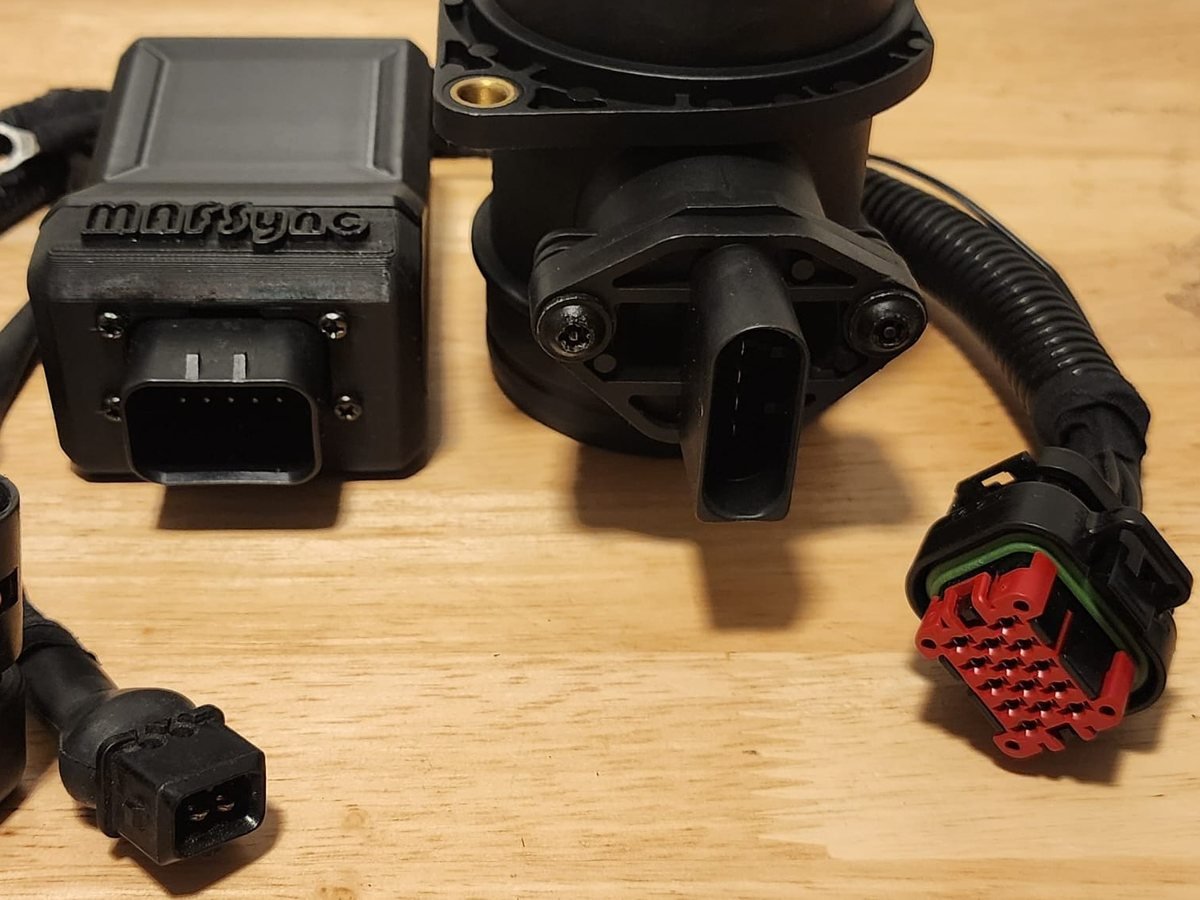
You're now part of the Revive Ur Ride family. Every unit is hand-built, bench-tested, and pre-tuned specifically for your engine before it ever ships. This page has everything you need: install guide, how-to videos, troubleshooting, and a direct line to us.
Got a question, an install issue, or something doesn't look right? Email our helpdesk directly and you'll hear back from a real person, not a ticket queue. Customer service is our priority, full stop.
Every unit is assembled and verified before it leaves the shop.
Flashed and configured for the exact engine code you ordered.
Email goes straight to the person who built your unit.
MAFSync is a plug-and-play install. No ECU flashing or cutting required. Follow the steps below in order.
Confirm your kit contains the MAFSync module, the pre-terminated harness for your engine's connector, mounting hardware, and the quick-start card. Check the label on the inside of the box. It should match the engine code you ordered.
Your MAFSync arrives pre-flashed for the engine you ordered, so there's nothing to configure or load. Just confirm the label on the unit matches your car before installing.
Find the factory airflow meter connector in the engine bay. It's usually on or near the airbox/intake boot, feeding into the factory harness toward the DME.
Disconnect the negative battery terminal before doing any wiring. This protects the DME and prevents shorts while you're working around the harness.
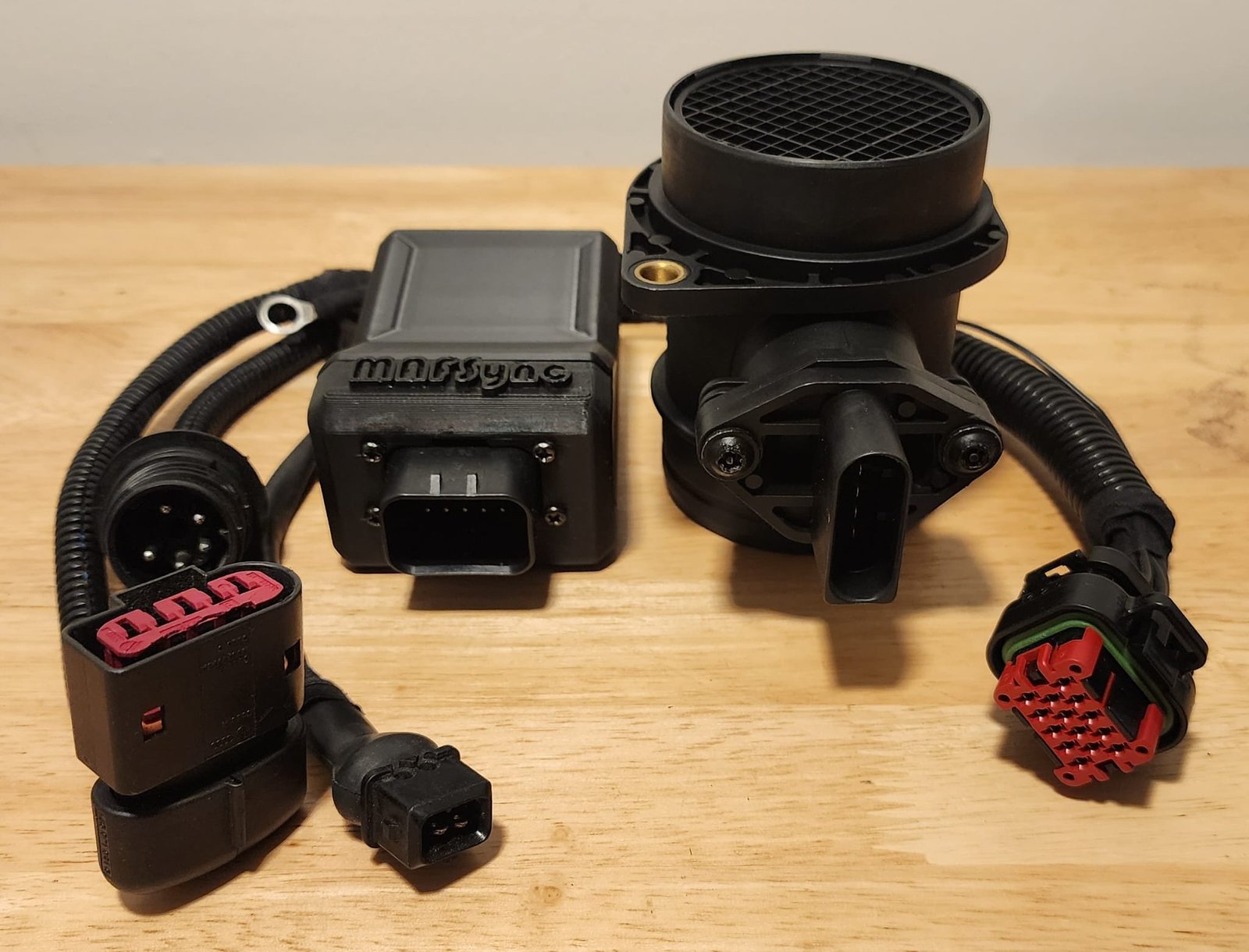
MAFSync installs in-line between your new hot-wire MAF sensor and the factory AFM-side connector, with no splicing or cutting of the factory harness. Plug the harness fully into both ends until each connector clicks/seats.
Secure the module somewhere clean and dry, away from exhaust heat and moving parts (belts, fan). Zip-tie the harness clear of anything that moves or gets hot, keeping it away from ignition coil primary wiring where possible.
Reconnect the negative terminal. With the key on (engine off), confirm the status LED on the module lights up steady. That means the unit is powered and ready.
Start the car and let it idle. It's normal for idle to be slightly rough for the first minute while the ECU relearns fueling. It should settle into a smooth, stable idle. No check engine light should be present.
Get the latest features and performance improvements by updating your module, right from your garage. You can do this yourself; it just takes a slightly more hands-on step to reach the hardware.
A one-time link, one click in your browser. No IDE and nothing to install. Plug in the module and flash.
Carefully open the module's case, or make a small hole in the side, to reach the internal USB connector.
A standard USB data cable (not charge-only) and a PC running Chrome or Edge.
Email us for the flash. We'll reply with a one-time link to the web updater. Plug in, click once, done.
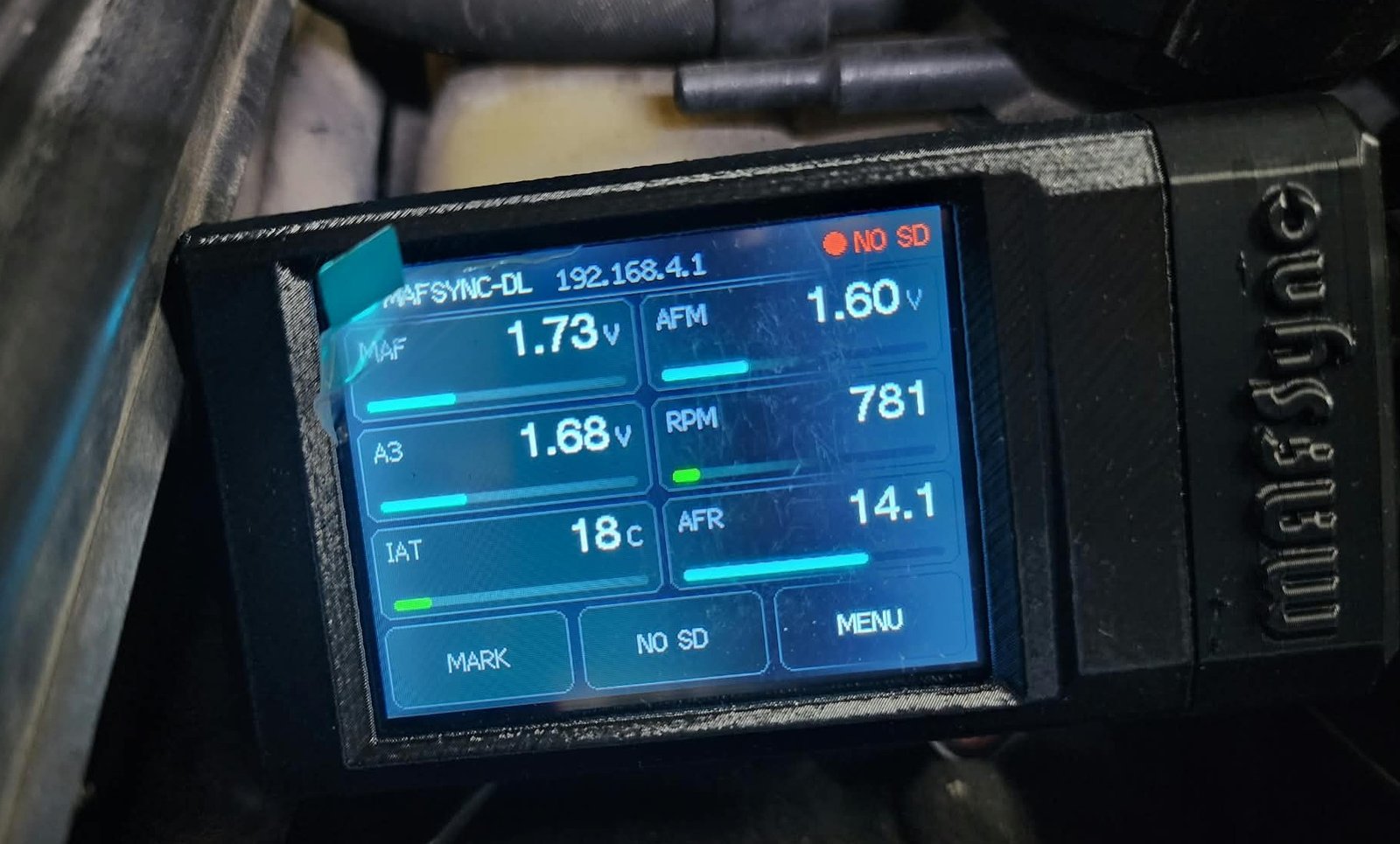
For the DataLogger Kit only. The DL-6 display records your drives to a microSD card and runs its own WiFi network, so you can watch live data and download logs from any phone, tablet or laptop. Nothing to install.
A microSD card may not be included in your kit. If yours didn't come with one, any name-brand card will do.
NO SD, the card is missing, not seated or not FAT32.logs folder as log0001.csv, log0002.csv and so on. Once you've opened the web page on your phone, new log names also include the date and time.MAFSync-DLmafsync123http://192.168.4.1The logger powers up and starts its WiFi. When WiFi is on, 192.168.4.1 shows at the top of the screen. If it doesn't, switch WiFi AP on in the on-screen menu.
On your phone or laptop, connect to MAFSync-DL with the password mafsync123.
Your phone will warn that the network has no internet. Choose to stay connected. If the page won't load, turn off mobile data so the phone doesn't switch away.
Type http://192.168.4.1 into your browser's address bar for live data. Go to http://192.168.4.1/logs to download or delete recorded logs.
Up to 4 devices can connect at once. The logger's WiFi has no internet, so switch back to your normal WiFi or mobile data to email your logs in.
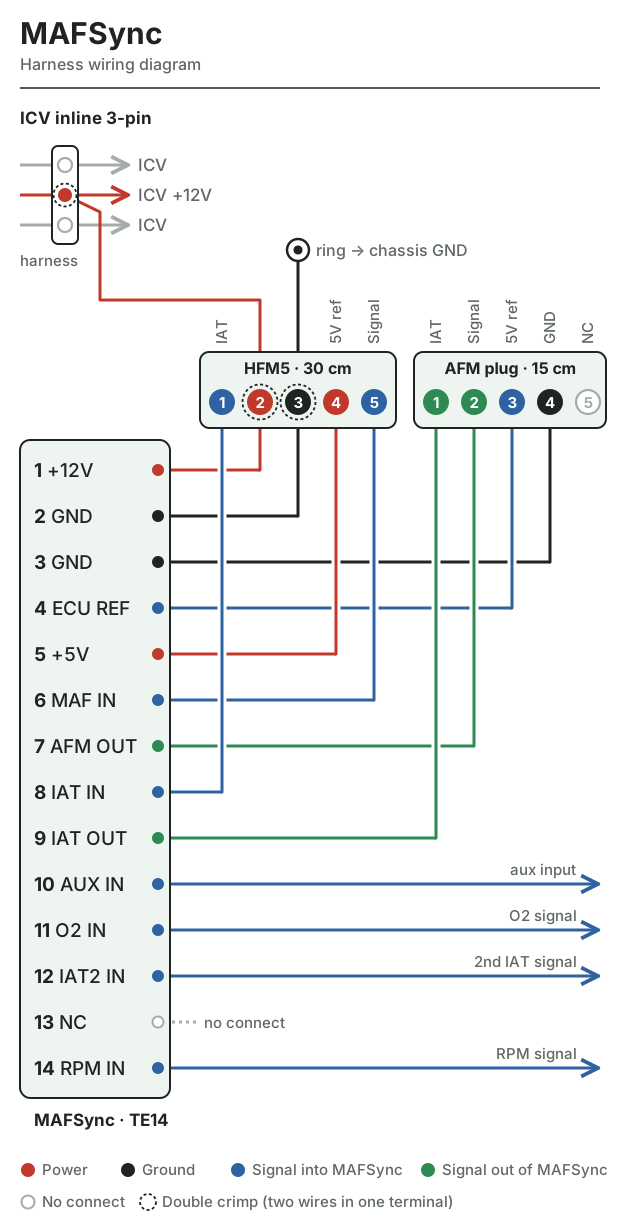
Wiring it up? Check every connection against the harness diagram and the three plugs below before you power on. Each plug lists the reading a healthy pin should give on a multimeter.
How the MAFSync harness connects the module, the MAF sensor and your car's AFM plug.
Tap the diagram to open it full size, then pinch to zoom.
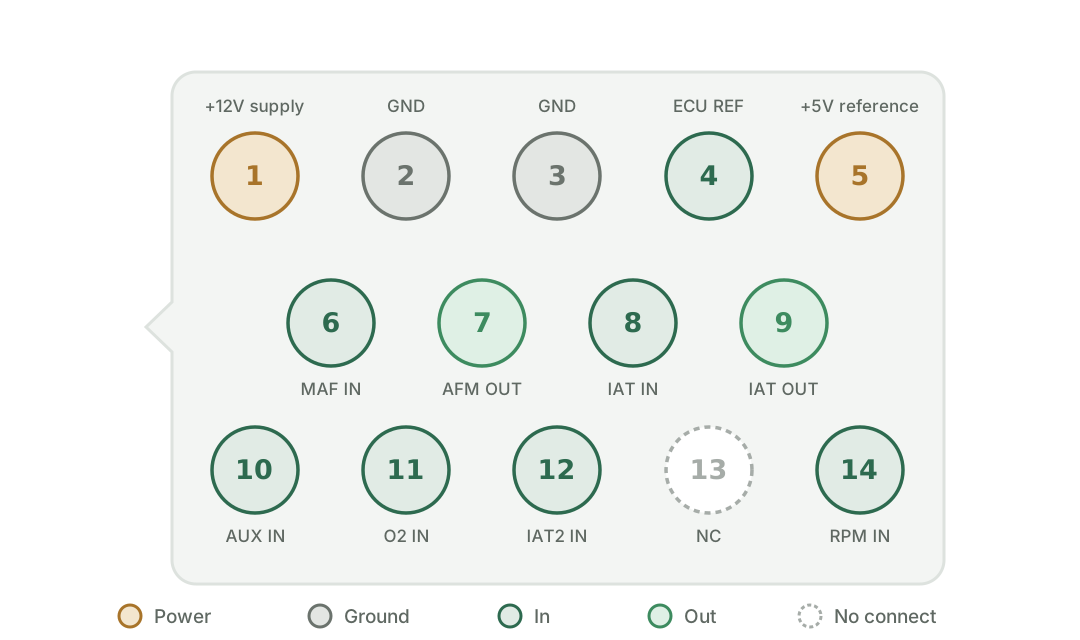
Viewed from the module side, facing the connector. Pins 1–9 are all a standard build uses. Pins 10–14 are only populated on the DataLogger Kit.
Shown rotated to fit your screen. Tap it to open the full-size diagram.
| Pin | Function | Dir | Expected reading |
|---|---|---|---|
1 | +12 V supply | Power | ~12–14 V, key on |
2 | GND | Ground | <0.5 Ω to battery − |
3 | GND | Ground | <0.5 Ω to battery − |
4 | ECU REF | In | Reference from DME (engine-dependent) |
5 | +5 V reference | Power | ~5 V, key on |
6 | MAF IN | In | HFM5 signal, ~1.0 V at rest, rises with rpm |
7 | AFM OUT | Out | KOEO ~0.2–0.3 V, idle ~0.9–1.4 V, rises with load* |
8 | IAT IN | In | NTC, resistance falls as it warms |
9 | IAT OUT | Out | Emulated IAT to DME (NTC-equivalent). Pins 1–9 end here on a standard build. |
10 | AUX IN | In | DataLogger only. Application-specific |
11 | O2 IN | In | DataLogger only. Narrowband ~0.1–0.9 V oscillating (if wired) |
12 | IAT2 IN | In | DataLogger only. Second IAT sensor (NTC), resistance falls as it warms |
13 | NC | None | Not connected. Leave this pin empty. |
14 | RPM IN | In | DataLogger only. Tach signal from the ignition |
*AFM output is profile-dependent; the values shown are typical (e.g. an M42B18 profile idles near 1.33 V). Step-by-step checks are under Harness Testing in Troubleshooting.
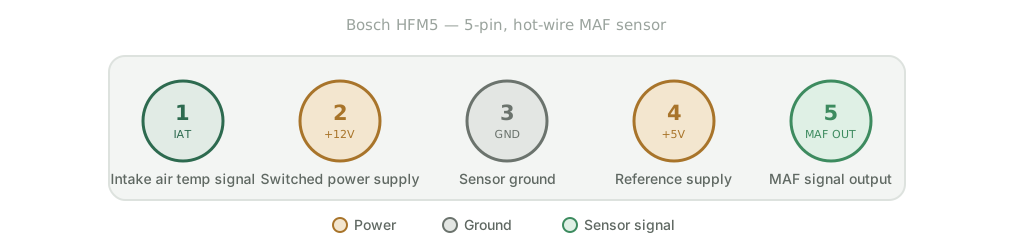
The hot-wire MAF that MAFSync reads. Test at the sensor plug with it connected (backprobe), key on.
Shown rotated to fit your screen. Tap it to open the full-size diagram.
| Pin | Function | To TE14 pin | Expected reading |
|---|---|---|---|
1 | IAT signal | 8 IAT IN | NTC: about 2.0 kΩ at 25 °C to pin 3, unplugged. Drops as it warms. |
2 | +12 V supply | 1 +12 V | ~12–14 V to ground, key on |
3 | Sensor ground | 2/3 GND | <0.5 Ω to battery − |
4 | +5 V reference | 5 +5 V | ~5.0 V, key on |
5 | MAF signal out | 6 MAF IN | 1.00–1.02 V key on, no airflow. Rises smoothly with rpm. |
A zero-flow reading well off 1.00–1.02 V usually means a bad sensor.
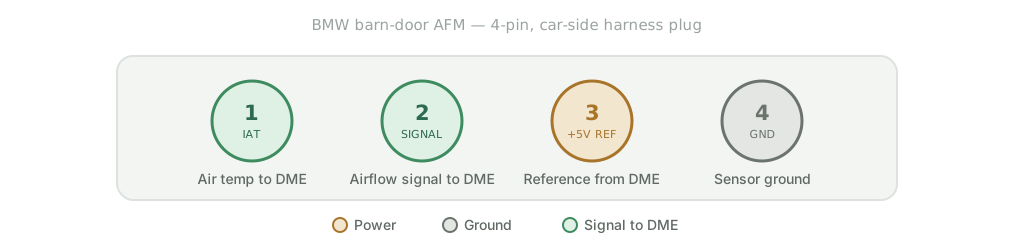
The factory plug that used to go on your barn-door AFM. MAFSync plugs in here and talks to the DME. Test with MAFSync connected (backprobe), key on.
Shown rotated to fit your screen. Tap it to open the full-size diagram.
| Pin | Function | From TE14 pin | Expected reading |
|---|---|---|---|
1 | IAT to DME | 9 IAT OUT | Emulated NTC: about 2 kΩ at 20–25 °C to pin 4. Drops as it warms. |
2 | AFM signal to DME | 7 AFM OUT | Key on, engine off ~0.2–0.3 V. Idle ~0.9–1.4 V*. Rises with load, stays under ~4.6 V. |
3 | +5 V reference | 4 ECU REF | ~5.0 V from the DME, key on |
4 | Sensor ground | 2/3 GND | <0.5 Ω to battery − |
*Idle voltage depends on the engine profile (for example M20B25 sits near 0.87 V, M42B18 near 1.33 V). No 5 V on pin 3 means a DME or harness fault, not MAFSync.
Prefer to watch instead of read? These walk through the install and common questions step by step.
Most issues come down to one of these. Check here before emailing. It might save you a step.
Before chasing a fault, verify the harness with a multimeter. Most "won't start" and "no signal" calls come down to a connector that isn't fully seated or a supply/ground that isn't there. Work through the checks below in order.
The pin-by-pin values for all three plugs (the MAFSync TE14, the HFM5 MAF and the car's AFM plug) are in the Harness & Pinout Diagram section above. Use them with the steps below.
The DL-6 display shows the MAF and AFM voltages live, so you can check pins 6 and 7 without backprobing. Compare what's on screen with the values in the pinout tables.
A meter is still the right tool for power, ground and continuity (steps 1–2 below).
With the negative terminal off and the DMM in continuity mode, buzz out each harness conductor end-to-end. Then confirm there is no continuity between adjacent pins. A short between signal and power is the fault that damages a DME.
Pin 1 (+12 V) to chassis ground should read ~12–14 V. Pins 2/3 (GND) to battery negative should read <0.5 Ω. No power or a high-resistance ground = fix that first; everything downstream depends on it.
Backprobe pin 6 (MAF IN). It should sit near 1.0 V at idle and climb smoothly as you blip the throttle. A dead flat, pinned-high, or twitchy reading points at the sensor or its wiring, not MAFSync.
Backprobe pin 7 (AFM OUT). Key-on should read a low resting voltage; idle should be a steady mid value that rises with load. A flatline that never moves means the module isn't seeing power or the connector isn't fully seated. Recheck steps 1–2.
Push both connectors home until they click, dress the harness clear of heat and moving parts, then repeat the power-on check. Still off after a full drive cycle? Email us your readings from steps 2–4 and we'll narrow it down fast.
Send us a note with your order number, engine code, and what you're seeing (photos help). We'll get back to you directly.